
Workflow Operations
Run and operate workflows from interactive chat or the workflow tool: identify runs, inspect their graphs, communicate with stages, answer human-input gates, and manage durable execution.Automatic stage models
For stages authored withmodel: "auto", Atomic ranks up to three distinct eligible models before starting execution. It tries them in order, retaining each selected effort, before remaining configured fallbacks and the current chat model. Duplicate model IDs are skipped. The primary model/effort and ordered fallbacks are retained as routerSelection, independently of the actual model, thinkingLevel, and attempts, together with candidates, every model the router could choose from after filtering. Remaining unsuffixed fallbacks inherit the primary effort; explicit suffixes retain their own effort. Every automatic fallback must satisfy the stage’s hard constraints and the modelRouting settings.
Model selection uses the actual stage prompt, stage name, hard constraints, eligible model catalog, and compact dated evaluation records, not full human guides. Stage system and appended system prompts are not sent to the model router. Put requirements that should influence model selection in the stage prompt; the execution session still receives its configured system prompts.
Malformed or schema-invalid chat routing answers receive up to three corrective retries after the initial attempt. A classifier routing failure, including a provider size or context rejection, switches to the current chat model instead of repeating the classifier request. Transient provider failures (connection errors, HTTP 408, 429 and 5xx) are retried up to three times with backoff. Model selection has no built-in wall-clock deadline; cancellation and independent provider limits still apply. An unset or auto router uses the current chat model; an explicit routerModel selects a registered classifier or chat model. Saved classifier credentials do not select the router. If routing inference fails completely, the stage runs on the current chat model instead of failing, with a recorded warning, but only when that model is available and satisfies every routing constraint (such as allowedModels and effort, cost, context and input limits). Otherwise the stage fails. An empty eligible catalog, stale decisions, credential-bearing routing context and cancellation still prevent stage execution without fallback. Choose router and chat providers permitted to receive the stage task and reference context.
Replay reuses recorded results without routing. Resume of a saved auto stage retains its verified selection and revalidates it against the current catalog and restrictions before fresh session admission, without a hidden new decision. If it is no longer eligible, resume fails rather than choosing another model. See authoring automatic stages.
Workflow run identifiers and the BACKGROUND panel
Workflow run identifiers are shown in full in status views, pickers, control messages, and theBACKGROUND panel. Selectors accept either the full 36-character UUID or its unique 8-character hexadecimal prefix. Other truncated forms are rejected. Colliding prefixes report the matching full UUIDs and require a full UUID; resolved results retain canonical identifiers.
Stage selectors preserve exact stage IDs and names, composite runId:stageId IDs, and tool:<argsHash> IDs. Bare UUID stage IDs additionally accept a unique 8-character hexadecimal prefix across the expanded graph. Exact names take precedence. Partial names and truncated composite/tool IDs do not match; colliding UUID prefixes require the full stage UUID.
Intercom delivery to pending workflow stages
A workflow stage uses the root-anchoredworkflow:<rootRunId>/<segment>[/<segment>...] path shown by intercom list and workflow status surfaces. A segment may be a stage name, a materialized run id, or a glob: * matches one segment and may be embedded, while ** matches any depth. Model-facing workflow status and interactive status list/detail surfaces enumerate materialized pending stages by display name and canonical stage ID, printing the path only when pendingStageDeliveryAvailable is true and the owning run is nonterminal. An ended root or nested child never advertises a retained pending target. Duplicate names remain independently identifiable. The workflow SDK sessionId is not an Intercom target.
Join workflow:<rootRunId> and run intercom({ action: "list" }) to see live sessions, materialized PENDING/RUNNING stages, and possible future literal, glob, and nested-child targets with queued counts. Then use ordinary Intercom delivery:
workflow:<rootRunId>/** (or a narrower path pattern) rather than enumerating stages; live matches receive it immediately and future descendants receive it before their first model turn. A syntactically valid path outside the persisted known set queues with a notInKnownSet warning and settles undeliverable at terminal only if never delivered; an entry delivered at least once is not reported undeliverable. Use ask once the stage session is live and can reply.
To verify a sticky update, inspect its per-stage deliveryStates in intercom list or workflow({ action: "status", runId: "<rootRunId>" }). The future target’s queued count includes messages retained for stages that have not started yet, even after delivery to earlier stages. It is not an unread count or proof of receipt by every stage. delivered confirms admission to stage context, not compliance with the update. A transport-only or older receipt appears as receipt-unverified; check the stage transcript before resending. See pending delivery states for skip reasons and recovery.
Reading and scrolling the panel
At 80 columns and wider, eachBACKGROUND card shows the full run identity, mode, progress, live-tool details, and elapsed/status metadata. Remaining row space may show pending stages. Each target appears exactly or is replaced by a stage-labeled canonical ID; … N more counts omitted stages. If neither form fits, the pending label is omitted rather than displacing existing metadata. Tool nodes are read-only durable graph nodes, not attachable stage chats.
The widget uses at most 10 rows, including its final scroll hint, and at most one third of the terminal height, rounded down with a one-row minimum. Scrolling over it moves only its list, even at either end. Scrolling outside it retains normal transcript behavior. A slim scrollbar appears only when the allocated area overflows; there is no numeric row-range counter. Every row stays reachable even when a multiline draft leaves only one widget row.
From the main editor, use Alt+K to scroll up and Alt+J down one row. On macOS these are Option+K/J. Alt+PageUp/PageDown remain aliases. Configured editor bindings always win, including Vim-style Alt+J/K cursor bindings; Alt+Up still restores queued messages. Scrolling never takes focus from the editor. Customize app.workflows.scrollUp and app.workflows.scrollDown in keybindings.json; arrays replace defaults, and [] disables an action. The list’s final hint shows available bindings.
Mouse scrolling requires Atomic’s fullscreen renderer and terminal mouse reporting. On macOS, enable your terminal’s Option-as-Alt or Option-as-Meta setting for these shortcuts. If the terminal emits a character instead, reserves a shortcut, or does not forward wheel events, use the Page aliases or remap the actions to keys your terminal sends. Linux and Windows terminals also vary; terminal and multiplexer settings can intercept input. Plain typing, arrows, and unmodified PageUp/PageDown retain their editor behavior.
Below 80 columns, the widget collapses to one count line, truncated to fit. It omits run IDs, stage identities, targets, tool names, prompt text, and connect commands. Widen the terminal to scroll cards, or use /workflow connect to inspect runs at narrow widths.
Stage progress includes nested child workflows and updates as stages appear:
- The numerator counts completed, failed, and skipped stages.
- The denominator counts currently materialized stages, not future work.
- Expanded children replace their workflow boundary; neither the boundary nor durable tool nodes add to the stage count.
- Failed, skipped, missing, or invalid child expansions retain their boundary summary.
single/chain uses the same count.
Pending questions and exact identities
TheBACKGROUND panel sits below the editor. When a visible root has exactly one displayable pending question, its card shows a quoted one-line preview and Answer: /workflow connect <full-visible-root-UUID>. Use the full UUID on that row. The preview strips terminal controls and fits within its cell budget. Nested prompts retain their real run, stage, and prompt owner, even though the connect command targets the visible root.
Atomic keeps general needs-attention guidance instead when a root has multiple questions, missing descriptors, empty sanitized text, a multi-question questionnaire, or unproven nested ownership. Eligibility is per root, so one card can show a preview while another shows general guidance.
Previews update or clear as questions are answered or cancelled. They never enter the transcript or parent-model context. workflowNotifications.notifyOn is unchanged. The graph, stage chat, and workflow answer remain available; F2 still opens only the active workflow, not every waiting row.
Status, run detail, dispatch confirmation, and run-picker cards wrap full IDs onto continuation rows. Run detail also wraps exact pending-stage addresses instead of ellipsizing them. Narrow status cards wrap the canonical stage ID or drop its display-name decoration, never show a partial ID. Borders stay closed at the minimum layout width; narrower terminals, including sub-30-column terminals, can hard-clip the box.
An AWAITING INPUT banner has two identity rows: ? with the full run id, then the workflow name and optional metadata. The question and options appear below it in the normal prompt UI.
The /workflow connect run picker shows five runs at a time; use the arrow keys or mouse wheel to scroll through additional retained runs.
The rendered card shape at the 80-column breakpoint is:
▾ 4 background · 2 ● · 1 quit; a tool-only run adds its live count, for example ▾ 1 background · 1 ● · 1 tool.
Running Workflows
List or inspect unfamiliar workflows before running them. If required inputs are missing and cannot be inferred, ask for the missing values before launch:- discovery:
list,get,inputs, plusmodelsfor the configured model catalog - execution:
runwith the workflow name and validatedinputs - inspection:
status,stages,stage,transcript - prompt response:
answer; run control:pause,quit,resume; free-form stage communication: ordinary Intercomsend/liveasktoworkflow:<rootRunId>/<segment>[/<segment>...]path targets, including*and**globs - rediscovery:
reload
workflow tool call has a hard 150-second wall-clock deadline at the public tool boundary. It covers request handling through the returned result; for background run and resume, it covers startup and acknowledgement, not the workflow execution that continues afterward. A deadline returns one structured result:
reload, run, answer, pause, resume, and quit), the error additionally says that the outcome is unknown and instructs you to inspect workflow status before retrying; a timeout never claims that a mutation succeeded. When a timed-out run has already allocated its detached run, the structured result includes that exact full runId; inspect status with that id before any retry. A timeout before run allocation has no runId. Read-only actions (models, list, get, inputs, status, stages, stage, and transcript) omit that unknown-state guidance.
Explicit user interruption is different from the request deadline. Before startup acknowledgement, interrupting a run tool call cancels its initialization owner, records an allocated root as locally killed, and prevents delayed setup from starting workflow code. An already-aborted request starts no action. Interrupted resume preparation releases a claim it has acquired instead of dispatching later. After startup acknowledgement, the workflow is detached: aborting the original caller does not stop it; use run-level controls.
Cancellation does not undo committed journal writes or external effects. Inspect status and external effects before retrying an interrupted mutation. A request timeout does not cancel an already accepted detached launch.
Run-level quit preserves eligible checkpointed work as a paused run instead of cancelling its durable record. Inspect /workflow status <run-id> if it reports a storage error; local suspension alone is not proof that the journal saved the pause.
From interactive chat, named workflow launches run in the background so the parent chat stays available. Run /workflow connect <run> to see agents working and chat with and steer each stage. Inspection, prompt-response, and control calls (status, stages, stage, transcript, answer, pause, resume, quit) remain available while work runs.
The no-runId status listing includes bounded pending-stage rows after each run summary. Each row gives the display name, canonical stage ID, literal pending lifecycle, pendingStageDeliveryAvailable, and either the exact usable Intercom target or unavailable. Interactive status cards and run detail show the same identity/availability distinction within their width budgets. Status cards wrap exact targets onto continuation rows instead of rendering a partially truncated address; bounded omissions retain an explicit remaining-stage count.
workflow({ action: "models" }) returns the registry’s configured-auth catalog snapshot in registry order. Each entry includes provider, id, fullId, an isCurrent marker, and availableThinkingLevels derived from the real model’s reasoning and thinkingLevelMap metadata. This is not proof of credentials, entitlements, OAuth freshness, or live provider access, and it exposes no authentication details.
Named launches wait only for startup admission, not for workflow completion. Atomic returns status: "running" after durable registration, reusable-worktree setup, and other pre-body setup succeed, while the workflow body and stages continue in the background. If setup fails before the workflow body is admitted — for example, git_worktree_dir points inside the invoking checkout — the original workflow tool call instead returns a structured status: "failed" result with the allocated full run id and concrete setup error. Ordinary setup failures retain no background-start claim or orphan run, so the caller can correct the inputs and retry. Database-unavailable admission instead preserves the failed local run and skips durable cleanup; follow the recovery guidance below before retrying. Failures after admission remain ordinary background lifecycle outcomes reported through status and lifecycle notices.
A model may launch in the foreground only when the user explicitly requests it or foreground execution is technically required, and it must tell the user before launching.
Inspect the workflow’s input contract, then launch it by name:
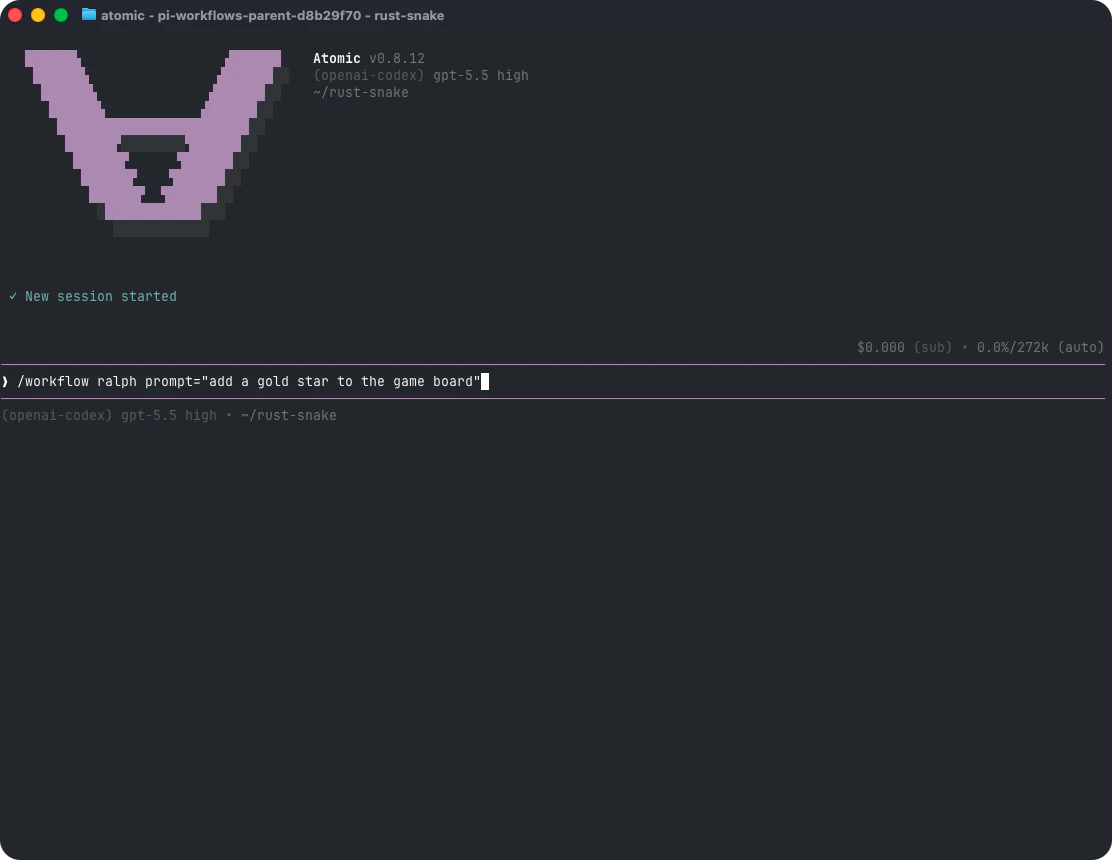
key=value tokens. Atomic parses values as JSON when possible, so count=3, flag=true, and prompt="multi word value" preserve useful types. A whole input object can also be passed as one JSON token. Runtime validation is strict: unknown input keys, missing required values, type mismatches, and invalid select choices fail before a named workflow run starts or before a child workflow starts.
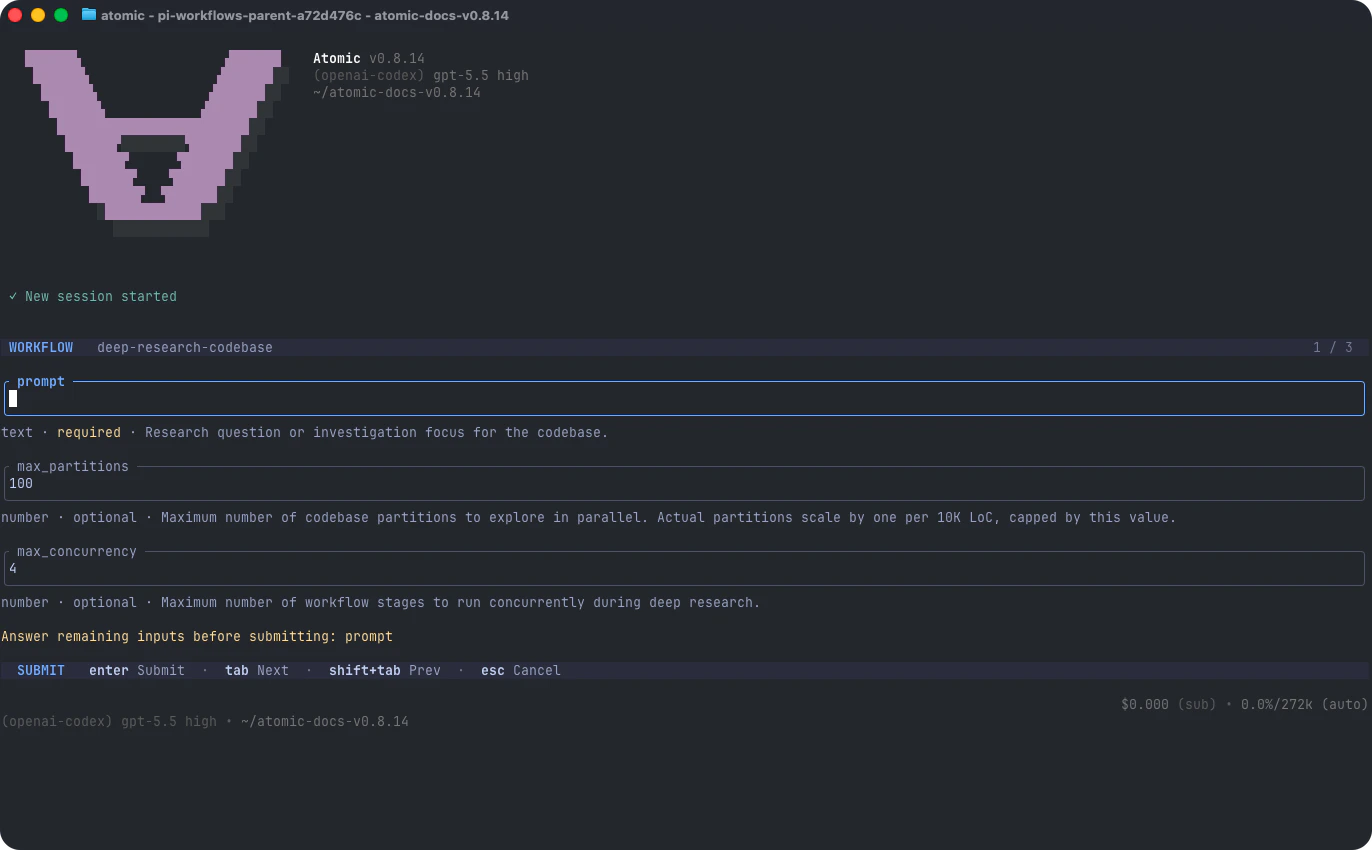
In the TUI, /workflow <name> opens an inline input picker when the workflow declares inputs and either no arguments were supplied or required inputs are missing. Supplied values seed the picker. The picker is mounted and focused in the terminal host in both isolated and non-isolated interactive modes, so Tab/Shift+Tab, arrows, text editing, configured keybindings, Enter, Escape, and Ctrl+C remain responsive without per-keypress host⇄engine traffic. Escape or Ctrl+C cancels without starting the workflow. Pass --no-picker to skip that interactive flow.
In headless (-p, --print, or --mode json) sessions, named workflow dispatch skips pickers and returns an accepted run identity rather than waiting for terminal completion. Inspect workflow status for progress, errors and results. Lack of rendering or an input adapter is not an execution restriction: a required durable gate remains pending until an authorized host or answer arrives, never silently succeeds. Explicit NON_INTERACTIVE_WORKFLOW_POLICY supplied to the runtime or dispatcher still enforces its restrictions.
SDK applications can instead bind human-input callbacks without a terminal. The same workflow definition can collect text, confirmation and stage questionnaires through that host, including in nested workflows. Ordinary unsupported dialogs refuse; durable approval prompts remain pending without a usable host. Do not remove or bypass a required approval to make a headless run finish. Custom terminal widgets still require a presentation host.
Withdrawing an SDK adapter cancels its current presentation, not the durable approval. Bind a replacement adapter to answer a live pending request. To hand off a persisted run, gracefully quit it, retain its definition and durable storage, then use the existing resume command in the other host. Completed checkpointed tool results are reused; an effect without a saved checkpoint is not guaranteed exactly once. Inspect status for the current pending prompt before answering. Old or repeated answers cannot authorize a new request, and host rebinding never raises an exhausted budget.
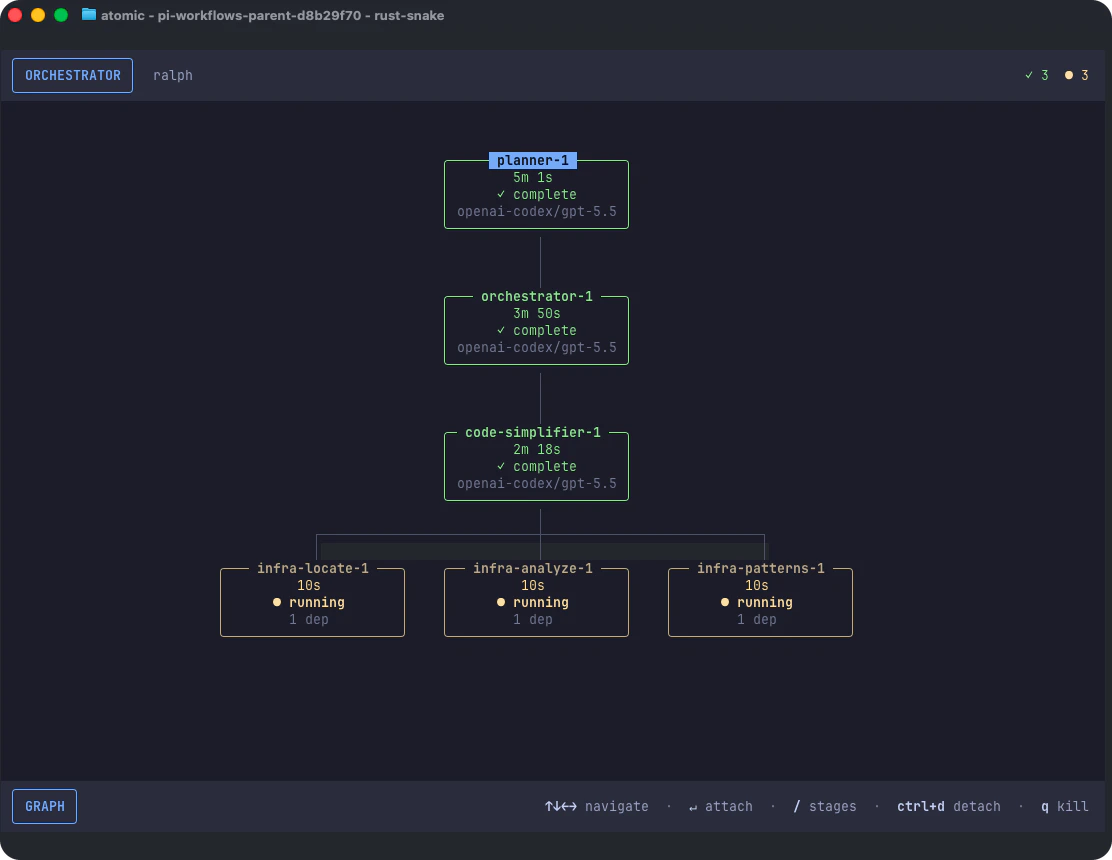
-fast model suffix. This suffix is model identity, not a separate fast-mode switch or proof of service tier. Thinking off is omitted; stages without a model show no model placeholder. Tool nodes retain their durable tool body, and the BACKGROUND summary is unchanged.
Workflow Commands
- Graph vs. stage chat - Use
connectfor the workflow graph. Useattachwhen you want a chat pane for a specific stage. - Hierarchy chord -
ctrl+xis the workflow hierarchy chord: in an attached stage chat it means return to graph, and in the graph it means return to main chat. The workflow surface handlesctrl+xbefore configurable editor or tool actions, including while a composer draft, primitive prompt, custom question, stage switcher, or legacy prompt card owns input. - Stage input label - Attached stage chats show
[stage: name]on the composer top rule, a mounted question’s top rule, and awaiting-input prompt borders so you can tell which stage owns the input. Long names truncate with…. - Draft preservation - Leaving a stage preserves unsent composer and prompt drafts and keeps pending custom questions unresolved so they reappear when you attach again.
- Queued-message survival - Detaching preserves queued steering and follow-up text. Reattach to see the pending messages; the graph shows their count as
✉ N queued. Queues also survive model fallback and eligible post-mortem reopening. Custom session adapters must publishqueue_updatesnapshots and expose pre-attachment queues as described in authoring. - Reserved keys -
ctrl+dandqdo not navigate workflow surfaces;ctrl+dkeeps its ordinary editor or prompt behavior where applicable, andqremains printable in text-owning prompts. Existingesc,ctrl+c, and graphhclose/hide controls are unchanged. - Wheel and trackpad - While the workflow graph is active, vertical wheel/trackpad gestures pan it up and down, and horizontal gestures pan wide graphs left and right when the terminal exposes horizontal wheel events. Focused graph and stage-chat overlays receive those gestures through the fullscreen application route, so scrolling stays inside the active workflow surface instead of falling through to terminal or main-chat scrollback.
- Selection and copying - Graph panning, stage scrolling, click-to-attach, and drag or multi-click selection work without a separate selection mode. Copy uses OSC 52; if the terminal blocks it, use its Shift/Option modifier-drag bypass.
ctrl+tretains the host thinking toggle, not a workflow action. - Tool and node detail - Attached stage chats match main chat’s tool-detail expansion behavior while keeping expansion state local to the workflow UI context. Press Ctrl+O (the configurable
app.tools.expandbinding) to expand every visible workflow node and tool card, including single, parallel, and nested subagent progress, current tool activity, and artifact paths; press it again to collapse them. The toggle works for active, completed, and archived stage views, including at the supported 40-column terminal minimum. A mounted prompt, custom question, or other input-owning overlay keeps the key instead of changing it. - Footer context - An attached live stage chat shows its own current folder and Git branch and mirrors live extension status lines such as the MCP server indicator. Branch changes trigger a repaint through the host’s cached footer provider. The compact
/taskspicker retains this context and the stage’s model and reasoning level even while its foreground turn streams; detail, transcript, input, and confirmation pages remain fullscreen. - Working indicator - Stage chat shows
∀during accepted prompt startup and active work, including retained-session follow-ups. Retry, fallback, compaction, cancellation, and errors take precedence.NO_COLORremoves foreground colors;ATOMIC_REDUCED_MOTION=1makes the indicator static. - Subagent statusline - If a subagent is running while the fullscreen workflow graph is open, the graph statusline mirrors its summary so the run remains visible; hide the graph with
h, leave it withctrl+x, or reconnect later to return to the full below-editor widget. - Run control - Use
pauseandresumefor resumable live work. Pause holds a stage’s queued steering and follow-up items in place without dequeuing them or starting continuation;resumereleases those items once in their existing per-queue order, but queue release alone does not start a model turn.resumeon a non-paused run reopens the saved snapshot or overlay. Usequitto pause a live run gracefully while preserving it for/workflow resume./workflow pauseselects the active run by default, accepts a full run id or--all, and does not open a stage picker. Use the workflow tool’sstageIdfor stage or tool-node targeting. - Rediscovery - Use
/workflow reloadafter adding, editing, installing, or removing workflow resources or package manifest workflow entries and you want Atomic to rediscover them in-process (Reloading workflow resources). - Status listing -
/workflow statuslists all retained active and terminal top-level runs by default; implementation-owned nested child runs are flattened into their parent workflow rather than listed separately./workflow status --allis retained as a compatibility alias. - Status times -
/workflow status <run-id>displaysstartedandendedin the system local timezone asHH:mm:ss. If they differ from your expected clock, check the timezone of the machine or container running Atomic and any inheritedTZenvironment setting. Elapsed durations and raw timestamps in structured results are unchanged.
/workflows is the retained-run history alias for /workflow resume: with no id it opens the same mixed picker, but the resumable section lists only runs that the resume path can actually accept and the completed section is read-only inspection. A run with no durable checkpoint, missing/pruned artifacts, or explicit deletion is omitted from the resume picker; an explicit /workflow resume <id> still returns an explanatory error. It is intentionally different from /workflow list, which lists installed workflow definitions. See /workflow resume — cross-session resume selector for the full picker semantics.
At the supported 40-column terminal minimum, attached stage chats keep the ctrl+x return to graph hierarchy hint. The TUI may truncate provider/model context to make room, but it keeps that context separate from the hierarchy hint so the controls stay readable.
Skills in attached stage chats
Use/skill:<selector> [arguments] in an editable stage composer, including qualified selectors such as /skill:review@project. Completion reads that stage’s own resource catalog and enableSkillCommands setting, with the same source tags as main chat. The next completion request reflects a stage resource reload. If the host cannot expose stage command metadata, it reports discovery as unavailable instead of substituting main-chat resources.
Suggestions use the terminal’s default background, including selected rows; accent text and the selection arrow mark the current choice, matching main chat.
Enter starts an idle turn or steers a streaming turn; Ctrl+F preserves follow-up delivery. The command stays bound to the submitted stage even if you switch panes. Its session performs the existing expansion once, including the selected skill’s location, candidate identity, base directory, and trimmed arguments. Relative skill references use the skill directory; tools retain the stage cwd and restrictions. Manually typed commands still work when suggestions are disabled. Unknown bare selectors pass through unchanged, while qualified-resolution and file-read errors appear in the attached chat.
Mounted HIL and custom prompts take precedence: a /skill: answer is literal prompt input. Blocked stages, read-only archives, and replay do not admit skill messages. Explicit editable post-mortem chat can use its own skills, but cannot revive a workflow node or change the completed DAG. Skill invocation grants no additional delegation or tool authority and does not forward unrelated commands to the parent chat.
/tasks opens the owner task list locally, never a skill or model message. Empty and populated lists use the same compact picker as main chat, without combining tasks from other chats. Enter inspects the selected task; focused actions offer retained transcript inspection, foreground waiting, confirmed cancellation, and stdin when available. Terminal tasks omit live actions. Escape returns to the picker with selection preserved, then to chat. A stage question arriving during inspection remains pending and is shown when you leave the inspector. Task navigation does not create a main-chat input-needed notice; genuine main-chat prompts waiting behind a visible graph still do.
/tasks is also suggested in the stage slash menu independently of enableSkillCommands. Its background-task status appears below MCP status; the graph-return shortcut does not overwrite the task-inspection hint. Pausing a workflow stage cancels its active and admitted queued background agents and commands and waits for cleanup. It blocks fresh launches immediately; already-in-flight command setup may briefly start during the transition but must drain and be cancelled before pause completes. Stage-scoped pause leaves main-chat tasks and sibling stages alone. Merely detaching the chat or ending a foreground turn does not cancel background work. Closing the stage generation still cancels remaining owned work.
If inspection fails, the host displays the error and keeps your input for retry. It does not send the command to the model.
/tasks is reserved for local task inspection; stage extensions cannot override it. Tab completes paths relative to the stage cwd; @ file mentions are unavailable.
Monitor and Control Runs
The workflow tool exposes lifecycle controls for non-interactive use:runIdaccepts the full UUID or a unique 8-character hexadecimal prefix for lifecycle and inspection actions, includingstatus. Status lists and run pickers show top-level user-launched workflows; nested child runs remain part of the expanded parent graph.status,stages,stage, andtranscriptwith a fullrunIduse the session store, then read the journal if the run is absent locally. Inspection never claims ownership or executes workflow code. A running root with an expired lease appears ascrashed; a live foreign lease remains protected.statuswithoutrunIdlists every top-level run in the session with a concise per-run summary: the full run id, workflow name, run status, started/ended timing with pause-adjusted elapsed time, currently active stages, and awaiting-input details (count plus the stage, prompt id, kind, and message for each pending human prompt). In-flight runs are listed first. The summaries carry the exact identifiers thatanswer,pause,resume, andquitaccept, so an orchestrating agent can list runs and act on them directly.statuswith arunIdincludes the run’s final outputs asdetail.result, also when another session started the run and Atomic reads it back from the journal. The detail lists every stage and can be large for a run with many stages. Addsummary: truefor a compactsummaryobject instead ofdetail:runId,name,status, timing,result,error,resumable,resumeGuidance, andblockers. Each blocker names a failed or blocked stage orctx.toolnode, or a stage awaiting input (with itspromptIdand prompt text), and is empty for a run that completed, was cancelled, or was killed. The summary omits the stage and tool history;summaryhas no effect on thestatuslisting without arunId.statusFilternarrows thestatusrun listing: run statuses (pending,running,paused,blocked,completed,failed,skipped,cancelled,killed) match runs directly,awaiting_inputselects runs with at least one stage awaiting input or pending human prompt, andall(the default) includes everything.format: "json"on data-bearing inspection actions (status,stages,stage,transcript) returns the full structured result; the default text output forstatusis the concise per-run summary list.status/status <runId>show terminalctx.exit(...)statuses (completed,skipped,cancelled, orblocked) and the optional exit reason when one was supplied.stageslists stage summaries, including flattened stages from nestedctx.workflow(...)imports andsessionFile/transcriptPathwhen a stage has a persisted session. UsestatusFilter: "all"to include completed, failed, skipped, and pending stages.stagereturns details and the persistedsessionFilefor an exact stage ID/name or a unique bare UUID prefix, including nested child stages in the expanded graph. Partial names do not resolve. Ambiguous names or UUID prefixes report collisions.- Local and retained/durable
stageslistings use the same expanded graph asstageandtranscript: pass the listed ID back unchanged with that listing’srunId. Valid nested boundaries are replaced by their descendants; missing, empty, or invalid children retain an inspectable boundary summary. Detail/transcript results identify the actual owning run and local stage ID. - Intercom’s slash-separated
targetis a messaging address, not aworkflowstageId. An Intercom stage row also includes its owningrunIdand localstageId; pass that pair tostageortranscript, or use the expanded ID fromworkflow stageswith the root run ID. transcriptis reference-first with a small preview by default: it returns metadata, transcript paths, and up to 5 recent entries. For targeted lookup, quote the exactsessionFile/transcriptPathvalue without changing platform separators (preserve Windows backslashes), search it withrgorgrep, then read only small surrounding ranges. Text results include JSON-escapedsessionFileJson/transcriptPathJsonlines for copy-safe path literals. Pass explicittailorlimitto override the 5-entry preview;tailoverrideslimit;includeToolOutputincludes captured snapshot tool output in snapshot transcript results.answerresponds only to a pending primitive or structured human-input prompt. It acceptspromptIdplusresponse,text, ormessage, preserves prompt-kind validation, and never sends stage chat, steers, resumes, or starts a model turn.- Send free-form updates through ordinary Intercom to
workflow:<rootRunId>/<segment>[/<segment>...];*matches one segment and**any depth. Useintercom listinside the invocation group to see live, pending, and possible future targets. Atomic delivers immediately to live stages and queues matching future stages, delivering them before their first model turn.workflow:<rootRunId>/**remains sticky for every future descendant until root termination; narrower name and pattern sends reach every future match. Valid paths outside the known set queue with anotInKnownSetwarning and settle undeliverable at terminal only if never delivered. Useaskonce the target has a reply-capable live session. Useworkflow resumeonly for paused workflow control. pauseandquitcan target one top-level run orall: true;stageIdcannot be combined withall: true. Stage-scopedpausecontrols can target a visible nested child stage from the expanded graph. Atomic routes stage controls to the owning nested run internally.pauseandquitcan also name one in-flightctx.toolnode withstageId, by expanded node id, localtool:<argsHash>id, or tool name. Both mean the same thing for a tool: abort that single call now. Tool nodes stay non-attachable — this is an abort control, not a chat target. Identifiers resolve exactly first and then uniquely; a name shared by two tool nodes (or by a stage and a tool) returns the same ambiguity diagnostic stages get, listing each match as<name> (tool).- Aborting one tool node leaves every sibling stage and sibling tool node running and does not pause the run. The node becomes
cancelled, writes no replayable checkpoint, and re-runs on a later resume. Whether the run itself survives is ordinary author control flow: an awaitedctx.toolthat is aborted rejects, exactly as it would for any other failure, unless the workflow catches it. A node that has already settled reports that it is not running rather than silently succeeding. - If targeted cancellation escapes workflow code, the failed run records
failedToolNodeId, not a fabricatedfailedStageId. Resume the run without a stage override to retry that unfinished tool and replay completed work. The tool remains a non-attachablecancelledtool node. - Whole-run
quitstays authoritative even if workflow code catches the tool rejection. A catch may run cleanup, but its returned outputs do not convert the quit into a completed run: the executor suspends and quit’s paused/resumable record stands. To abort one call and intentionally keep the workflow going, target that node instead of quitting the run. - A targeted tool abort reports the node outcome and the run separately:
status: "cancelled"for the node it cancelled,stageIdfor that node,abandonedwhen the callback ignored its signal, andworkflowStatusfor the run status observed when the action returned. It never reportspaused, and it never predicts what the run does next. pausepreserves resumable live work. With no active stage/tool handle (including initialization and between-node waits), it keeps the same executor paused rather than quitting it. Run-levelresumeon that live process releases the barrier exactly once; later tracked steps, cached replay, and run completion wait for that explicit resume. An already-started untracked JavaScript await or non-cancellable I/O may still finish; pause cannot physically freeze arbitrary author code or roll back effects. A stage declared during this pause defers registration until its asynchronous method runs after resume; synchronous session access requires resume first.- A stage pause cancels that generation’s owned task executions, not its queued messages or future workflow stages. User and Intercom messages remain held until resume; resume allows fresh tasks and never restarts the cancelled executions. Cancellation and cleanup failures reject the pause rather than reporting a successful stop.
- A whole-run executor-only pause also holds already-live owned child workflows, including children with no tracked node yet. Resume persists the root’s running transition before releasing those child executors; a child-scoped control leaves sibling workflows alone.
- Live executor resume does not require a checkpoint. Cross-process resume still requires durable checkpoint or pending-prompt progress: losing a zero-progress live owner cannot reconstruct its JavaScript continuation. Cancelling the original startup request before acknowledgement remains terminal cancellation, not this live pause.
resumecan target a live paused stage withstageId; the target may be an exact stage id or an exact stage name.messageis forwarded to paused work. Durable/cross-process resume is whole-run only and refuses a stage selector before dispatch rather than resuming the entire root. For a live interrupted streaming prompt, Atomic preserves the existing prompt loop without duplicating the user message and injectsContinue where you left off. If you believe you are finished with your original task (or a redefined task if the user told you), stop.when required before normal readiness-gate completion. For a paused stage that was idle waiting for a new stage-chat turn, a non-empty message resumes the stage and starts exactly one fresh prompt containing that message; an empty resume releases the pause without creating a prompt.- An explicit workflow-tool
resumetarget absent locally triggers journal discovery. Prefixes require successful discovery before selecting a unique UUID; discovery failure cannot select a local prefix match. Malformed targets are rejected before lookup. Ordinarystatuslisting remains session-local. - Exact-id durable inspection is separate from resume.
status,stages,stage, andtranscriptmay hydrate one missing-local root for read-only inspection, but they never claim it or execute replay. Only an explicitresumeaction enters the claim-and-dispatch path. - Run-level
quitgracefully pauses in-flight work and preserves eligible checkpointed runs for/workflow resume. Runs waiting during initialization or between nodes are also controllable, even with no active stage or tool. An executor-only quit retires the owner (including one already paused); without usable durable progress it is nonresumable and offers no resume hint. reloadrefreshes discovered workflow resources in-process; the optionalreasonis echoed in the result.
Diagnosing a stage with an empty history
The run display shows stage execution durations without extra startup rows. To inspect startup diagnostics, use the workflow tool’sstage / stages output. Live stages report startup with the current phase, total startup age, and seconds on the current step, for example startup reload-active (45s total, 45s on current step; active). Phases are model resolution, route authority, resource preparation, queued/active resource reload, SDK creation, extension binding, attachment, delivery readiness, and first dispatch. An allocated session ID is not proof of attachment; first dispatch is not proof of a provider response or reviewer approval.
Slow startup is not automatically killed. Pause and graceful quit retain their resumable hold semantics; resume may still join the same pending creation and does not reset its age. Repeated pause/resume is not a startup restart.
Explicit stage abort() or execution-owner cancellation rejects startup callers promptly. A cancelled stage may still show ownershipPending: true: non-cancellable resource loading, SDK creation, or binding must finish before its owner can be released. Cancelled queued siblings never begin their reload. Do not retry in-process while cleanup remains pending. If the operation never settles, stop the owning Atomic process before starting fresh execution; reconcile external effects first. Fresh execution is not a resumed reviewer approval, and a zero-progress run may have no usable durable continuation.
Pausing, quitting, and resuming
If a stage is waiting onask_user_question, /workflow quit <run-id> or workflow({ action: "quit", runId: "<run-id>" }) cancels and dismisses that question without requiring an answer. This includes the “Are you ready to move on to the next stage?” question and questions in nested stages. Quit leaves the run paused under the usual resume rules; it does not approve the question or advance downstream work. Questions belonging to other runs are unaffected. After resuming a cancelled readiness question, answer the new question; an old answer cannot restart the run.
If pause or quit reports a stage cancellation error, do not assume that stage stopped: check /workflow status <run-id> before retrying. A readiness answer already accepted by a stage whose stop failed can continue normally; it does not require resume unless the stage actually paused.
Graceful quit is idempotent for an already-paused resumable run. Pending durable questions remain associated with that run; answers cannot advance it until explicit resume.
Pause holds the live executor, while quit retires it at a durability boundary. Neither freezes arbitrary JavaScript or rolls back effects. Already-started non-cancellable I/O can finish later. A run quit before any durable progress may be nonresumable.
Quit stops admitting tool calls, cancels owned in-flight calls, and waits a bounded time for cleanup. The result lists cancelledTools and any abandonedTools with their owning {runId, nodeId}. An abandoned callback may still have external effects. Inspect those effects before resuming; unfinished callbacks run again, while completed checkpoints replay.
If the journal pause cannot be saved, the run remains locally paused. Preserve the run ID, restore storage access, and inspect status. Retrying quit can save the pause; resume retries the running transition before releasing the executor. Existing checkpoints remain available, but a failed write does not create durable progress.
Catching a tool cancellation cannot turn whole-run quit into completion. To abort one tool and continue the workflow, target the tool node instead.
When a paused stage interrupted an active model turn, Atomic preserves that turn’s existing pause loop: a non-empty resume message is delivered exactly once through the resumed loop, and (if the stage has not finalized) Atomic injects Continue where you left off. If you believe you are finished with your original task (or a redefined task if the user told you), stop. before normal completion/readiness handling. A no-message interrupted-turn resume injects the same continuation directly. A different state applies when the stage was idle and waiting for a new stage-chat turn: resuming with a non-empty message starts exactly one fresh prompt containing the text, while an empty resume only releases the pause and does not fabricate a user turn or continuation.
The same continuation applies to user messages queued into a live streaming stage. Steering a turn (Enter in an attached stage chat) or queueing a follow-up (Ctrl+F) arms the identical continuation prompt, which Atomic injects once when the interrupted turn ends — even if several messages were queued during that turn — so a steered stage returns to its original (or user-redefined) objective instead of stopping after answering the queued message.
Messages delivered to an idle stage start a fresh user turn immediately and receive no continuation nudge; abort, kill, workflow exit, and finalized/fail-fast stage boundaries suppress late prompt creation and continuation injection.
Resuming several stages can make partial progress. Inspect status after an acknowledgement or persistence error: stages already running are not retried, and genuinely paused stages remain available for another resume. A later resume can retry a failed durable-state update. Terminal runs cannot be revived.
Post-mortem chat vs. execution resume
These are distinct operations. Resuming workflow execution (/workflow resume) is for paused, interrupted, recoverably failed, or unfinished durable work; it may replay checkpoints, continue an incomplete stage, and dispatch remaining DAG work. Opening a post-mortem chat reopens one terminal agent stage’s retained conversation for follow-up only — it never resumes, retries, rewinds, or otherwise changes workflow execution.
Any eligible terminal agent stage with a valid retained session opens as an interactive post-mortem chat through the explicit user-driven TUI path: completed-workflow inspection, /workflow attach, or /workflow connect followed by stage selection, including restored/replayed durable snapshots after a restart. Explicit /workflow attach <root-run> <nested-stage> targets are resolved through the expanded graph and routed to the child run that owns the stage while the overlay remains rooted on the requested graph; the resolved owner is preserved when sibling child workflows reuse the same local stage ID.
When a run ends, whether it completed, failed, or was cancelled, Atomic disposes the live session of each completed stage whose conversation is saved, so a long-lived session does not hold every finished stage in memory. Resuming a failed run replays its completed stages from the saved run and does not need their live sessions. A paused or still-running run keeps its sessions. Attaching to such a stage or messaging it reopens the saved conversation first, which takes a moment, without rerunning the workflow. While the session that ran the workflow is open, the released stage also stays in the Intercom session list under its previous name as closed · reply: post-mortem only: an ask to it reopens the saved conversation, runs one turn with the question, and returns that turn’s final answer (or a failure if the conversation cannot be reopened), and a plain send is delivered to the session that ran the workflow. Once that session ends or is replaced, the Intercom entry is gone; reopen the stage with /workflow attach. A stage with a mounted chat (visible or hidden), queued or in-flight messages, an active turn, compaction or retry, or no saved transcript keeps its live session, and it is not released again when that need ends; it stays until the session that ran the workflow is replaced or shut down. A stage you reopen by attaching, messaging, or an Intercom ask also stays in memory until then, so memory grows by one session for each released stage you actually reopen. The saved transcript, result, and run record are never removed.
Intercom and explicit /workflow attach own stage communication. The workflow tool has no free-form message action; start a new workflow if tracked work remains after a terminal root.
When a nested stage is reopened after a restart or from another checkout through the explicit TUI path, its session cwd comes from the durable root workflow (resolved workflow cwd first, then original invocation cwd) while stage-control ownership remains with the actual child run. Follow-up turns are appended in place to the stage’s retained session (no separate fork), so the agent may still invoke its ordinary tools and cause side effects; only the workflow DAG, run/stage status, results, timings, checkpoints, and topology are immutable. Post-mortem chat does not resume or modify workflow execution state.
During a live post-mortem turn, Escape aborts only the retained conversation’s active work and restores queued steering/follow-up text to the editor. The conversation queue remains held. Clearing or restoring every visible queued item does not release that hold. The next ordinary submission releases the conversation queue before starting a new turn. Neither action pauses, resumes, or changes the terminal workflow execution state.
Every host session replacement or shutdown invalidates post-mortem handles, including a session whose lazy reopen is still pending: if creation finishes after the boundary, Atomic disposes the newly created session and rejects the already-submitted prompt before it can execute. A stage stays a read-only transcript when it has no valid retained agent session — prompt/HIL and boundary/summary nodes, skipped nodes without a completed conversation, non-terminal handle-less stages (another process may still own the session), and missing/malformed/deleted session files.
When a known stage cannot be reopened, the attached chat shows the complete SESSION UNAVAILABLE explanation down to the supported 40-column minimum instead of incorrectly labeling an invalid file as an archived transcript. Recoverably failed stages keep their execution-resume semantics and are not silently reopened as post-mortem chat.
The target receives the original ask and replies with ordinary intercom.reply. Only its correlated reply satisfies the requester; another session cannot answer for it.
The target sees the original ask, and its normal intercom.reply remains correlated to the originating child session and message ID. The parent chat or another session cannot satisfy the waiter. Late-message routing uses single-owner claiming: after the workflow post-mortem router claims a completed-stage ask and assigns its completion promise, later listeners preserve that claim, making bundled extension registration order irrelevant.
This reopens only the conversation. The workflow DAG and terminal stage snapshot remain completed and are never resumed or re-dispatched. If the target run or stage was deleted, lacks a valid retained conversation, is non-resumable, or fails to reopen, the caller receives a bounded actionable intercom.ask tool error instead of waiting indefinitely.
Workflow stages and their subagent transcripts are excluded from ordinary /resume, atomic -r, --continue, and global history. Use workflow inspection and resume commands for stages; terminal subagents remain transcript artifacts, not resumable children. An explicit --session file path can still open a stage transcript. Older unmarked workflow sessions may remain in ordinary history.
Embedding hosts can run the same pause, quit, and resume actions programmatically with session.workflows; see Workflow run control.
Workflow activity for extensions
Extensions can subscribe withctx.observeWorkflowActivity(observer) and use the typed workflow_lifecycle, workflow_activity_changed, workflow_stage_completed, and workflow_heartbeat hooks. See Workflow activity and lifecycle hooks for the public types and subscription example.
The workflows extension publishes activity for its owning session, folding nested runs into full root summaries. Observation is silent and independent of workflowNotifications.enabled, notifyOn, and the user/agent attribution filters used by chat notices. It neither wakes the model nor adds graph nodes. The built-in Herdr reporter is one consumer: it reports these root states, combined with agent and approval-prompt activity, to the owning Herdr pane (see its setup guidance).
Registration delivers an ordered initial snapshot, followed by structurally changed root replacements and removals. Late attachment reconstructs current activity; historical
running records alone are not evidence of live execution. Durable catalog/resume hydration publishes recovering before awaiting the backend and ready afterwards. recovering and unavailable are unknown source states, not empty ready snapshots: do not interpret them as idle.
Lifecycle targets identify runs, stages, tools, and prompts. Nested stage/tool ids use the expanded graph’s runId:nodeId identity; runId still names the actual owning run and rootRunId names the aggregate. Control requests carry action and remain distinct from the status outcome. Prompt cancellation is not an answer. The completion convenience hook shares its event id with the corresponding successful stage lifecycle event and excludes failed/skipped stages. Only an explicit execution replay publishes delivery: "replay"; reading restored history never manufactures completion hooks. Heartbeats observe the existing configured scheduler cadence and do not prove execution.
Lifecycle Notices and Human Input
Atomic emits deduplicated main-chat notices when top-level workflow runs complete, fail, end blocked, or stop at an active recoverable provider/auth/rate-limit block. A recoverable block remains resumable (status surfaces and headless results report it as blocked even though the stored live snapshot stays active), is retained durably as blocked for cross-session resume, appears in the resume picker, and its notice says the workflow is blocked rather than implying terminal completion. Each blocked occurrence is deduped by its blockedAt timestamp, so a resumed workflow that hits another recoverable block re-notifies the invoking chat. Nested child workflow outcomes are reflected inside the expanded parent graph instead of producing separate top-level cards.
Treat blocked runs as continuable by default: resume, answer a pending prompt, steer, or use a follow-up workflow. An explicit inline/no-workflow request overrides this default. Safely hold/stop the affected run, reconcile completed work and in-flight side effects, then continue inline without duplicate execution or claiming completed work was undone. Preserve safety, authorization and validation. See execution-mode guidance. Resolve material ambiguity from objective and repository evidence. A budget_exceeded stop remains an authorization boundary: summarize progress and ask before raising the budget; do not evade the chosen limit by changing execution mode.
Lifecycle notices appear once in main chat without interrupting current streaming text. Atomic also queues a model update so later responses can correct stale progress claims. Notices waiting for delivery survive recoverable delivery failures; session replacement does not send them to an unrelated chat.
An awaiting-input workflow remains visible in status and connect views without waking the main model. Connect to the run to answer its question.
Resume of a recoverable block continues the same workflow ID and reuses completed checkpoints. It does not reroute, allocate a replacement instance or replay completed effects. Concurrent admission is refused while another executor or resume owns the instance. A fail-closed topology mismatch preserves the prior resumable snapshot and prompt answers for inspection and a corrected retry.
An unchanged blocked result or a non-resumable refusal is not progress. Inspect status under the same ID after resume. For provider/auth blocks, resolve the reported cause first: quota limits need recovery; expired or missing OAuth needs normal login; authentication preparation timeouts require checking the credential source. Then explicitly resume. Human-input waits and progressing model streams remain separate from authentication preparation deadlines.
Completed top-level ctx.tool nodes replay under the same ID. See ctx.tool — durable cached tool execution. A fail-closed topology mismatch preserves the previous resumable state; retry only after restoring the matching contract.
Attributed control actions on a top-level run report themselves too. /workflow <name> emits a WORKFLOW STARTED notice (▶), /workflow quit a WORKFLOW QUIT notice (⏹, warning tone, carrying a resumable field), and /workflow resume a WORKFLOW RESUMED notice (▶). These travel the same steer delivery, capped-backoff retry, and notice-card path as the failure notice. The quit text states that the stop was deliberate and user-requested and tells the model not to resume the run or take the work over unless asked, with /workflow resume <run-id> as the card hint; the resumed text does not, because the run is progressing again.
Only attributed user actions notify. The equivalent workflow({ action: "run" | "pause" | "quit" | "resume" }) tool calls stay silent: the tool result already tells the agent what it just did. /workflow pause does not attribute an actor or raise a main-chat control notice. Engine-internal transitions are silent too — answering a human-in-the-loop prompt resumes the run internally without waking the model. Workflow activity and lifecycle observation report pause requests independently of chat notices.
Two attributions. Origin is who launched the run and renders on every kind as “which you started” or “which the user started”; it is set once at dispatch, persisted through session restore and durable resume, and inherited by a continuation from the run it continues. Actor is who performed this one event and renders as “The user resumed” or “You resumed”. They differ routinely — the agent starts a run and the user quits it. A run with no recorded origin, including a restored snapshot, omits the clause entirely rather than guessing.
Each attributed request produces one notice. Whole-run resume reports the run; stage resume reports the stage when siblings remain paused. Quit does not also report its intermediate pause. Restored existing states stay silent, and nested children do not produce separate top-level notices.
Configure lifecycle behavior with workflowNotifications.enabled (default true) and workflowNotifications.notifyOn (default ["started", "completed", "failed", "blocked", "budget_warning", "awaiting_input", "paused", "quit", "resumed"]). A config that pins notifyOn explicitly keeps exactly the kinds it lists, so notifyOn: ["failed"] suppresses every control notice. budget_warning is delivered once per run and dimension through the same lifecycle-notice renderer.
Heartbeats are separate from lifecycle notices. They report ongoing top-level runs at the definition’s heartbeatIntervalMinutes, default 15; 0 disables them. workflowNotifications.notifyOn does not filter heartbeats. Terminal runs stop them; an already-visible card remains historical rather than an instruction to continue ended work. See heartbeat behavior.
Human input is runtime-only: call ctx.ui.input, ctx.ui.confirm, ctx.ui.select, ctx.ui.editor, or ctx.ui.custom<T> when the workflow needs a decision. No builder-level declaration is required or supported.
Human-in-the-loop prompts from ctx.ui.input, ctx.ui.confirm, ctx.ui.select, ctx.ui.editor, and ctx.ui.custom<T> appear as awaiting-input nodes in the workflow UI/graph viewer, not as ordinary chat modals. Workflow definitions do not declare HIL; runtime ctx.ui.* calls create prompt nodes. If the prompt lives inside an imported child workflow, it still appears in the same expanded parent graph so the user can focus and answer it without switching to a separate child status entry. When the attached stage has a pending prompt, its attribution banner is headed AWAITING INPUT and shows the full run id in a two-row identity block; the question and its options continue through the existing prompt UI below the banner.
When the below-editor BACKGROUND panel can prove exactly one displayable pending question for a visible root, it also shows that question as a one-line preview with /workflow connect <full-run-id>. Multiple or unavailable questions keep the existing needs-attention guidance. Answer in the connected graph, attached stage chat, or with workflow answer; the panel itself does not answer, restrict, or remove any of those paths.
Use /workflow connect <run-id> (or F2), then press Enter on the focused node or click a graph node to focus and open or attach it for local answers. Custom widget prompts mount inside the attached stage chat and must be completed interactively with the widget’s done(value) callback.
When a workflow needs human input, answer in the graph viewer or attached stage chat when possible:
workflow({ action: "answer", ... }) only while the root workflow is nonterminal; use promptId when it is present in the stage details, and provide answer content with response, text, or message. Arbitrary custom TUI widget prompts intentionally refuse this path in iteration 1 because a generic T cannot be reconstructed safely from a non-TUI payload.
ctx.ui.custom<T>(factory, options?) reuses Atomic’s TUI component path: the factory receives the same real (tui, theme, keybindings, done) types as extension ctx.ui.custom, and the workflow resumes with the value passed to done(value). Use options.label for a safe display-only graph/status label and options.replayIdentity when widget semantics can change without the callsite changing. Do not put secrets in labels or replay identities; only a hash of the identity is stored, and label text is not part of replay identity. Both inline connected rendering and overlay: true mount in the graph viewer’s attached stage chat: overlay is a placement hint rather than a capability request, so an in-stage ask_user_question — which always asks for an overlay — mounts, takes focus, and resolves like any other custom prompt. There is no nested host overlay above the graph chrome; the widget occupies the stage-chat custom-UI slot and overlayOptions / onHandle are not consumed there.
Stage-chat prompt answers can replay only while the source run remains in memory. StageSnapshot.promptAnswerState reports available, unavailable, or ambiguous; unavailable or ambiguous answers require a new prompt. These raw answers are not persisted. Durable ctx.ui answers have the separate checkpoint behavior described below.
Prompt replay keys include the prompt kind, message text, select choices, input/editor initial value, custom prompt identity hash, and hashed author callsite, so changing any of those inputs may intentionally re-ask on continuation. An empty ctx.ui.select(..., []) has no answerable choices and throws before creating a prompt node. Arbitrary custom-widget answers cannot be supplied through workflow answer; focus the custom awaiting-input node in the interactive graph instead.
If the user answers a human-in-the-loop prompt in the workflow UI or stage UI broker, the stage receives the answer directly and the active main chat receives a display-only notice (triggerTurn: false, excludeFromContext: true) containing a concise answer summary. The notice is rendered for the user and persisted for audit, but it does not wake the model, enter LLM context, or authorize answering any other workflow prompt. Prompt answers sent by the main-chat workflow tool are suppressed from this notice because the tool result already informs the current turn.
When an interactive, non-schema workflow stage calls ask_user_question, Atomic waits for the stage’s assistant turn to finish and then brokers the deterministic readiness question “Are you ready to move on to the next stage?”. This includes typed or freeform questionnaire answers reported as details.answers[].kind === "chat": the assistant first gives its normal conversational response, then the stage becomes awaiting_input with inputRequest.kind: "readiness_gate" in workflow status and graph surfaces.
In this chat-answer flow, choosing the ready option completes the stage and releases dependent stages. Choosing the not-ready option keeps the stage open for a genuine stage-chat turn and brokers readiness again after that turn. A chat answer is never treated as an invisible stay decision. On the readiness gate, Type something. sends the typed text as the next stage-chat message (empty or whitespace-only text cannot be submitted). Chat about this is a plain option — it does not open an inline editor — and stays by sending The user would like to chat more about this.
The readiness prompt can be answered in the attached stage UI or with workflow({ action: "answer", ... }). Ordinary structured-option answers retain their existing readiness behavior. A schema-backed stage that has successfully finalized through structured_output is terminal and does not reopen this readiness gate.
Durable Workflows and Cross-Session Resume
Atomic workflows persist runs in a SQLite journal. It opens on the first workflow action and commits registrations, checkpoints, and control transitions before reporting them as durable. The default file is~/.atomic/workflows/journal.sqlite; set ATOMIC_WORKFLOW_JOURNAL_PATH before starting Atomic to select another file. Keep a journal file on durable local storage. To share runs across machines, select a remote SQLite-compatible database through a storage adapter rather than placing the file on a network filesystem. Storage failures stop the action rather than selecting another store.
Select process-local memory explicitly with workflows.journal.memory: true or SDK RunOpts.journal: { memory: true }. It supports checkpoint replay within the process but not recovery after exit. See Choosing the durable backend.
Storage failures and recovery
Preserve the journal and full run ID when storage fails. Check the reported file, directory permissions, available space, and filesystem health. Restore access, inspect/workflow status <full-run-uuid>, and explicitly resume an eligible run. Do not delete the journal to bypass an error. A failed pause leaves the local executor paused; resume retries the durable running transition before releasing it. If that write also fails, the executor stays paused and the error is reported.
If recovery reports Workflow definition not found, restore the matching definition, run /workflow reload, and retry with the same full run ID. Changing a definition or its call order can invalidate checkpoint replay.
Multiple sessions
A run with a live journal lease cannot be claimed by another executor, even when a long-running tool has not updated its progress. After a process crashes and its lease expires (about two minutes without renewal), inspection reportscrashed. Concurrent resume attempts admit one executor. The same rules apply across machines that share a journal database; see Sharing storage across hosts.
SDK recovery requires the original working directory and journal. session.workflows.getRun(runId) and getStages(runId) inspect saved state without taking ownership; resume(runId) explicitly claims eligible work. Save the full UUID. An owning session can also release checkpointed paused runs through await session.dispose() or a session switch, allowing another authorized session to adopt them. See SDK run control.
Fencing prevents a displaced executor from saving new checkpoints, not from finishing arbitrary external effects already underway. Use idempotent effects and stable operation keys. Completed checkpoints replay; an unfinished callback may run again.
How it works
- Only
ctx.*work is checkpointed. Plain TypeScript outside those calls is not durable. - Completed tool, stage, prompt, and child-workflow checkpoints replay without repeating completed work. Unfinished work may run again.
- Resume and inspection read the journal, not chat transcripts, as the recovery catalog.
- Unsupported or inconsistent saved topology is refused rather than repaired by guessing. Preserve the run ID and diagnostic.
- Independent roots persist independently; nested workflows share their root’s ordering.
ctx.* call order can invalidate replay. Finish or delete retained runs before incompatible changes. On mismatch, restore the matching definition rather than changing names or arguments to bypass a checkpoint.
Resume preserves graph identities, completed metadata, and pause-adjusted elapsed time. Completed children and durable tools/prompts replay; incomplete work continues. Stage-chat prompt answers remain live-memory-only. Use exact stage IDs when names collide.
ctx.tool — durable cached tool execution
ctx.tool(name, args, fn, options?) runs arbitrary TypeScript as a durable graph node and caches its result. The node has no stage chat controls. Its graph card always says durable tool, shows status separately, and does not preview the result or error.
Inspecting a tool result
Focus a tool node and press Enter, click it, or select it from the switcher to open its read-only card. The card shows the tool name, a short argument summary, and the result or error. The card starts collapsed, showing the last visual rows. Pressapp.tools.expand, normally Ctrl+O, to see the full bounded result and available callback source. Inspection never executes the callback or reads a source file.
The statusline shows the resolved key with expand or collapse, including remapped keys, alongside return and scroll hints. It omits that hint when expansion is unbound. Scroll with ↑/↓, PageUp/PageDown, Home/End, the wheel, or the scrollbar. Escape or ctrl+x returns to the graph. This view offers no chat attachment, steering, pause, or resume.
The footer shows Took or Elapsed; cached results are labelled. Truncation is marked with … [truncated]. Unrenderable values show placeholders rather than a complete result. Durable checkpoints retain the actual output.
Failures and replay
A throwing tool failure can fail the run even if the workflow body later returns. UsefailureMode: "return" when failure is expected data for a repair step. Status retains the selected failed tool’s identity and original error; later cancellation does not rewrite it as success.
Set failureMode: "return" when a failed check is expected data for a later repair stage. Atomic runs all configured retries first, then returns a WorkflowToolOutcome<TValue>. A successful callback returns { ok: true, value, attempts, cached }. An exhausted callback failure returns { ok: false, error, attempts, cached }; error preserves integer exitCode and string or byte-buffer stdout/stderr when the thrown value exposes them. The live and restored tool node stays failed, while the workflow body may continue and complete. On replay, Atomic returns the same stored outcome with cached: true and does not run the callback again.
On resume, completed top-level ctx.tool nodes retain their graph identity and cached outcomes, including concurrent Promise.all fan-out. A failureMode: "return" checkpoint, success or return_failure, is reused rather than running the callback again. All continuation attempts use the same run identity and checkpoint history.
Resume must match the retained workflow/checkpoint contract; do not change tool names or arguments to replay completed side effects. Inspection-only throwing records are not success checkpoints, so unfinished calls may execute again. Topology mismatches fail closed before unmatched live work is admitted; retained prompt answers and the prior resumable snapshot remain available for a corrected retry. An effect without a saved checkpoint is not guaranteed exactly once.
Recoverable output is explicit data flow. Atomic does not add a failed tool outcome to a later stage prompt. The workflow author must place the needed fields in prompt, previous, an output, or an artifact. Each persisted error text field is best-effort secret-redacted with the workflow persistence rules and limited to 16 KiB of UTF-8; truncated fields keep the final bytes with a marker. Keep the database sensitive even with this filter.
Cancellation, closed tool admission, and durable-storage faults still throw. They never become ordinary { ok: false } callback outcomes. Omitting failureMode: "return" also keeps the existing behavior: an exhausted callback error rejects ctx.tool and fails the workflow unless author code catches it. Atomic persists that failed node and the root’s selected tool link for later inspection, but excludes the failure record from the replay cache, so a resume or rerun calls the function again. Command failures that expose exitCode, stdout, or stderr remain failures even when a wrapper also uses cancellation-like text or codes; only a real run cancellation that wins the terminal race produces a killed/cancelled root.
Forward the callback’s { signal } to external work. Run cancellation stops every owned tool; a node-targeted pause or quit stops only that node. With timeoutMs, each attempt gets a fresh deadline; expiry counts as an attempt failure, not operator cancellation.
A cancelled tool is cancelled, not cached failure data, even in return mode. Resume may execute it again. A late result after cancellation does not become a successful checkpoint. Keep tool names, arguments, and call order compatible with the retained run.
Do not retain ctx.tool for detached work after the workflow ends. Calls after closure reject without starting their callback.
iteration makes each loop pass a distinct durable call. Reusing the same call position and arguments during resume replays its stored outcome instead of running it again.
/workflow resume — cross-session resume selector
The /workflow resume command mirrors /resume ergonomics and /workflows is its alias. With no ID, it builds a newest-first picker from eligible live runs and journal records. Selected records are revalidated before resume or inspection. Runs with live leases are excluded; expired running leases appear as crashed.
Picker rows use the run label when set, otherwise a one-line objective or prompt input, falling back to the workflow ID. When a generated progress summary is available, it has its own column; status and workflow name precede the identity in the other column. Live rows also show completed/total stages. Without a generated summary, the adjacent column shows those status details instead. Search matches the identity, summary, and full run ID.
Progress summaries are generated in the background at workflow heartbeat intervals and once when a run finishes or becomes blocked. The latest saved summary remains available without the original session; it may lag behind current progress. If generation is unavailable, the picker keeps showing the status details. Set sessionSummary.enabled to false to disable summary generation and resume-context messages.
Resuming through the picker, /workflow resume <id>, or the workflow tool adds the saved summary to the main chat as model-visible context, including the run ID, workflow name, status, and summarized-through timestamp. This does not start an extra model turn. Repeating resume for the same live attachment does not duplicate the message; runs without a summary add no message.
If resume reports a checkpoint decoding error or an unavailable serializer, retain the full run ID and original diagnostic when reporting the problem. Do not delete saved progress or launch a fresh copy just to bypass the error: that can repeat completed side effects.
Only runs with usable durable checkpoints or pending prompts can resume. Deleted durable entries and missing artifacts are not offered. Status and connect/attach still expose eligible terminal runs for inspection.
Rows carry semantic colors — completed green, paused yellow, failed/blocked/crashed red. The open picker live-updates on local run changes plus a bounded cross-session poll, so state transitions appear (and freshly running workflows disappear) without reopening it.
Ctrl+D deletes a highlighted inactive durable or completed row after confirmation. Deletion rechecks same-process activity and journal ownership, refuses running workflows, and leaves chat transcripts untouched. Eligible runs remain searchable regardless of age or count.
Only valid current-format journal records are selectable. Unsupported or malformed records are not reinterpreted.
Selecting a paused, resumable failed, blocked, or crash-recovery target from the current project re-dispatches the workflow with its cached inputs and the original workflow id. Every nested invocation validates and reuses its durable boundary and child identity before dispatch. Previously completed ctx.tool, ctx.ui, stage/task/chain/parallel items, and child boundaries replay from checkpoints instead of executing again; only incomplete work continues.
Workflow resume is project-scoped. Naming a resumable run from another project in an interactive /workflow resume <id> command asks: Workflow run found in different project: <cwd>. Fork it into the current directory? Choosing Yes creates a new run ID in the current directory, copies saved checkpoints and stage conversation history, and continues incomplete work there. Completed side effects replay from their saved results; the source run remains unchanged. Choosing No cancels without creating a run. The workflow definition must remain available in the current or original project. SDK, workflow-tool, and headless calls do not prompt: use the interactive command to fork, or reopen the original project to resume the original run.
The fork inherits the source run’s label and saved progress summary. When summaries are enabled and a saved summary exists, the main chat receives it before the fork resumes, identified by the new run ID and forked from <source run id>. Declining the fork adds no summary context.
A run quit while a ctx.tool call was in flight resumes the same way: the unfinished call left no replayable checkpoint, so resume re-executes exactly that callback at the same ordinal and tool:<argsHash> node id, while every completed tool — including a sibling that finished before the quit — replays from cache. A cancelled node never replays a cancellation as a value.
Selecting a completed target—or a checkpointed failed target marked non-resumable—follows a separate read-only open path. Atomic reconstructs root and reciprocal nested child-run snapshots from authoritative checkpoints, remaps persisted source-stage, boundary, and tool references into a stable expanded hierarchy, and never calls the resume dispatcher or runs workflow code, tools, tasks, or prompts. These graphs remain inspectable even when no retained chat transcript survives, including tool-only graphs.
A terminal child stage with a valid retained session may be reopened for detached post-mortem conversation through /workflow attach or completed graph inspection. Follow-up is routed to that real child {runId, stageId} and may append chat, but it cannot pause, resume, retry, mutate root or child execution state, write a terminal checkpoint, or emit a duplicate lifecycle notice. Tool nodes never offer chat attachment.
Older compatible tool checkpoints still replay their cached output without rerunning callbacks. Unsupported or malformed formats are refused; do not edit records to force recovery.
Fresh completed inspection does not currently persist the workflow’s declared root output. Live run() results still expose the declared output, and this output-persistence limit does not block durable tool topology or read-only graph inspection.
workflow surface reads the journal for explicit IDs. resume loads the definition, revalidates eligibility, then claims and dispatches the run. status, stages, stage, and transcript read a missing-local root without dispatching it. status without a run ID remains session-local.
Targets other than full UUIDs or 8-hex prefixes are rejected before catalog lookup. Durable read-only prefix inspection includes actively running roots owned by other sessions, without claiming or resuming them. Once resolved, subsequent stage and transcript inspection uses the canonical root UUID, even when a nested child shares its prefix. Completed or failed roots with valid checkpoints remain inspectable when retained conversations are unavailable; invalid transcript paths are stripped while the graph remains visible.
Validation uses the final retained transcript for a repeated stage replay key, so an obsolete superseded checkpoint path does not hide an otherwise valid read-only graph. Reopening inspection refreshes a changed authoritative retained-chat handle. Session-cache-only rows are hidden because the backend is authoritative. Checkpointed non-resumable failed roots appear only in read-only history; cancelled, killed, blocked non-resumable, failed roots without saved progress, and other terminal non-success states are never added. Normal /resume, atomic -r, and --continue behavior for internal workflow stage sessions is unchanged.
Recovering an uncaught tool abort
Afterworkflow({ action: "pause", runId, stageId: "tool:<argsHash>" }), inspect the run. If the author did not catch cancellation, its terminal status is failed, its selected frontier is failedToolNodeId, and the tool node is cancelled. Use /workflow resume <full-run-uuid> or workflow({ action: "resume", runId: "<full-run-uuid>" }) without stageId. Completed model and tool checkpoints replay without invoking their callbacks; only the unfinished tool and subsequent work execute. This does not roll back external work a cancelled callback performed before abort, so verify that retrying that unfinished operation is safe.
Recovery requires saved checkpoints proving one unfinished tool and its completed predecessors. When the failed tool ran in parallel (for example inside Promise.all), siblings that were cancelled because the run failed, or that threw in the same batch, are run again on resume and may be called before the failed tool. Any other tool reached before the failed tool is rejected before its callback runs, and the failed tool is not run either, so the run stays resumable once the original flow is restored. Missing, ambiguous, corrupt, or cyclic state fails with insufficient_state. Chat text and status snapshots cannot substitute for checkpoints. Preserve the original diagnostic and run ID when reporting a failure.
A tool-frontier continuation must reach and consume the exact unfinished tool before reporting completed, whether the body returns normally or calls ctx.exit({ status: "completed" }). Omitting the call, including by changing control flow, fails with insufficient_state: replay topology mismatch and the pending tool’s exact ID. A substituted tool is rejected before its callback runs. While that frontier is pending, completed model and child-workflow predecessors can replay, but new model stages, tasks, and child workflows cannot execute in its place. Stage and task worktree setup also waits for live admission. Replaying completed predecessors alone is not proof of completion. Failed replay publishes no successful result; inspect the same ID and restore the matching flow before another supported resume. Quit, kill, caught targeted cancellation, and intentional non-completed exits retain their existing behavior.
After upgrading Atomic itself or applying a code fix, start a new Atomic process; /workflow reload refreshes definitions, not loaded code.
If saved state cannot prove safe replay, reconcile the original run and external effects before choosing recovery. Do not restart the original workflow from the beginning to bypass the error. A separately authorized recovery-only workflow may perform verified remaining operations, but must not repeat completed side effects or fabricate checkpoints.
That history does not authorize any live release action.
Cancellation, failure, and retry semantics
Configuring journal storage
Setworkflows.journal.path in settings.json or set ATOMIC_WORKFLOW_JOURNAL_PATH before starting Atomic to select a local SQLite file. The non-empty environment value overrides settings; SDK RunOpts.journal and createAgentSession({ journal }) override both. Relative settings paths resolve against the Atomic home directory, normally ~/.atomic. With no override, Atomic uses ~/.atomic/workflows/journal.sqlite. To use a remote database, select an adapter module in workflows.journal or shared storage.
For process-local storage, use workflows.journal.memory: true without a non-empty settings path, or pass journal: { memory: true } to SDK run(). Memory is never selected after a storage failure. Preserve a SQLite journal and its sidecar files; use the same journal and working directory to resume an existing run. See Workflow storage settings.
Pending-stage Intercom cleanup checks durable ownership only for runs with messages that need settlement. Repeated failures with the same message produce one warning per extension instance. Interactive hosts receive a display-only notification, never a console stack trace, even if notification delivery fails; headless hosts retain a console diagnostic. Pending messages are not discarded when cleanup fails.
Fresh-process resume and inspection read authoritative checkpoints from the journal. Unsupported records are not treated as successful cached work. Keep the original diagnostic and run ID if decoding fails.
Workflow Locations
Atomic discovers workflow definitions in this order:
Workflow configuration and discovery use only the current
.atomic roots by default. ATOMIC_CODING_AGENT_DIR overrides the user agent directory. Import workflow APIs from @bastani/atomic/workflows and schemas from typebox.
A workflow module may export one default workflow definition and/or named workflow definitions. Discovery checks the default export first, then named exports.
Discovery validates every runtime export of a discovered workflow file as a workflow definition. Discovery rejects a named export that is not a workflow definition — a widget factory, shared constant, or utility function — with an INVALID_DEFINITION discovery diagnostic (export is not an object), even when the module also has a valid default export (the valid workflow still loads; the diagnostic flags the extra export as skipped). TypeScript erases type-only exports (export type / export interface) at runtime, so discovery never flags them.
To co-locate reusable helpers with your workflows — for example a ctx.ui.custom<T> widget factory you want to import in tests without running the workflow — put them in a subdirectory and import them from the workflow file. Discovery scans only the top level of each workflow directory, so subdirectories such as .atomic/workflows/lib/ are never treated as workflow modules:
Reloading workflow resources
Run/workflow reload after adding, editing, renaming, or deleting workflow modules or changing workflow config. Reload rescans project and user conventional directories, legacy .pi locations, configured file/directory paths, and package resources without restarting Atomic. The workflow tool’s reload action uses the same in-process path.
Reload is safe while workflows run: existing runs keep their starting definitions and controls, and new launches use the refreshed registry. A fatal refresh failure retains the previous registry. Top-level /reload also replaces extensions but preserves live runs in the same process. After a process exit, resumeInFlight controls startup recovery of eligible interrupted runs; use explicit resume for runs left untouched.
/new, /fork, and /resume are different: they leave the current session, so they quit running workflows. When any are running, Atomic asks first (“Quit N running workflows and start a new session?”). Confirming quits each run immediately at its last checkpoint; declining, or a confirmation prompt that fails, cancels the command and the runs keep going. Without an interactive UI (RPC, or an extension that switches sessions), the switch proceeds and the runs are quit the same way. Resume a quit run later with /workflow resume. The new session also lists the runs it inherited with their /workflow resume <id> commands, and its model can resume them through the workflow tool, which makes the new session their owner. /reload keeps runs executing and releases nothing.
The /workflow argument-completion popup reads that same live registry. Project, user, package-provided, and built-in workflow names therefore appear immediately after reload both after /workflow and after /workflow inputs ; restarting Atomic is not required.
A successful rescan may still contain per-resource diagnostics. Both reload surfaces show CONFIG_INVALID, IMPORT_FAILED, INVALID_DEFINITION, PATH_NOT_FOUND, and duplicate-name diagnostics instead of reporting bare success while silently skipping a resource. Valid sibling workflows remain available. Fix the reported source/path and reload again; no process restart is required.
Run budgets
Set an optionalbudget on workflow extension config or an authored definition. Direct workflow run calls use the registered workflow’s declared budget and an optional user-provided budget override. Approved resume calls may supply budget. Each field resolves independently: run override, then definition, then config default. Omission inherits; 0 disables only its dimension.
Budgets are operator-selected. Never invent a cap or convert an estimate into one. Pass only the fields and values the user requested. Raising an exhausted budget requires approval.
maxDurationMs and maxTokens must be non-negative finite integers. maxCost and warnAtPercent must be non-negative finite numbers. Invalid config produces CONFIG_INVALID; invalid authored or direct-run declarations throw a TypeError before the workflow body runs. Nested ctx.workflow(child) calls use the child’s own declared budget and remain subject to the root run’s duration scope; a root exhaustion wins simultaneous child exhaustion, while a child-only exhaustion soft-lands that child run and returns to the parent.
What each limit counts
maxDurationMsmeasures elapsed run time, excluding pauses and carrying prior elapsed time across resume. It is checked at stage and durable-tool boundaries and immediately after a completedctx.tasksaves its result checkpoint.maxTokenscounts uncached input plus output tokens across the complete run tree, including nested children and stage retries. Cache reads and writes remain separate reported counters.maxCostcharges the summedusage.cost.
Warnings and exhausted budgets
Abudget_warning notice is emitted once per run and dimension at warnAtPercent, default 80. On exhaustion, an already-live frontier stage gets one current-turn wrap-up. Atomic then records a resumable budget_exceeded block with its reading, ceiling, frontier, wrap-up summary, and wrapUpUsage when model usage is available.
Atomic never creates a stage just for wrap-up. If no stage turn is live at the boundary, the run stops without a wrap-up summary and leaves its once-per-run delivery allowance unused.
Resume carries prior duration, token, and cost spend without charging replayed completions again. After approval, pass a raised resume budget to continue with that prior spend.
Exhaustion after a task checkpoint
If the duration ceiling is exhausted after a task saves its result, the root becomes a resumablebudget_exceeded block, not raw running with no active or control node.
For ctx.parallel(..., { failFast: false }), the outcome depends on the tasks at that boundary:
- If every authored task reaches it after saving a complete result, Atomic waits for settlement and selects the earliest authored exhausted task as the resume frontier. A raised-budget resume replays those results without rerunning models, then continues after the parallel barrier.
- If any task was still pending at exhaustion or had an ordinary failure, the existing aggregate-failure behavior wins.
Workflow Configuration
Configured workflow paths live in workflow extension config. Project config paths are relative to the project root. Global config paths are relative to~/.atomic/agent.
Project config:
Startup recovery uses the durable catalog, not session transcripts. Only interrupted, checkpointed workflows still marked
running without pending human prompts and originally invoked in the current working directory are eligible. Runs from other projects sharing the database, or older runs without a recorded invocation directory, remain untouched and available through /workflow resume. Fresh-heartbeat live owners, paused or quit runs, failed or blocked runs, and runs awaiting input are not restarted automatically. "ask" leaves runs untouched when no confirmation UI is available or you decline. /workflow resume remains available in every mode. Session switches and /reload do not trigger startup recovery. Workflow resources must be enabled and available at startup. If project trust or missing resources prevent recovery, enable them and use /workflow resume. If recovery fails, Atomic reports a warning; use /workflow resume to retry.
Recovered agent-owned workflows belong to the recovering session, so its agent can inspect and control them. Adoption requires the same working directory and confirmation that the previous owner has stopped. Atomic will not take ownership from a live or unverified owner or override another session’s recovery.
After accepting startup recovery, inspect the original run ID with /workflow status <full-run-uuid> to confirm its next stages progress. If an older version failed with This extension ctx is stale, upgrade, restart Atomic, and resume the same run ID rather than launch a duplicate workflow.
Invalid JSON or invalid shapes produce CONFIG_INVALID diagnostics. Missing config files are ignored.
Settings
Settings can list package sources directly:workflows patterns follow package filtering rules:
- Omit
workflowsto load every workflow allowed by the package manifest. - Use
[]to load no workflows from that package. - Use
!patternto exclude matches. - Use
+pathto force-include an exact path. - Use
-pathto force-exclude an exact path.
atomic config to enable or disable package resources interactively. Atomic saves workflow package filters as workflows patterns in settings.
Package Setup
Atomic packages can ship workflows through package metadata or conventional directories. A package manifest can declare workflows next to extensions, skills, prompt templates, and themes:atomic-package for Atomic package discovery and pi-package for compatibility with existing package-gallery tooling.
For new Atomic package examples, prefer atomic.workflows and atomic.extensions. pi.workflows and pi.extensions remain supported for compatibility with existing packages. Workflows can be declared with atomic.workflows or discovered from conventional workflows/ / workflow/ directories. Unlike other resource types, package workflows still fall back to conventional directories when a package manifest exists but omits the workflow key. App-level config prefers atomicConfig where available; legacy piConfig is still read as a shim.
Convention directory example:
atomic install writes to global settings (~/.atomic/agent/settings.json). Use -l to write to project settings (.atomic/settings.json). A team can commit project settings to share the same workflow package set.
To try a package for one run, use --extension or -e:
-e resource discovery snapshot as the main chat. That means a workflow loaded from an external package or directory can start stages that see the package’s extensions/tools, subagents and agent definitions, skills, prompt templates, themes, workflows, and trusted borrowed project-local resources without sharing the parent chat’s resource-loader instance. Passing an explicit resourceLoader in stage options still opts that stage out of this inheritance.