
Sessions
Atomic saves conversations as sessions so you can continue work, branch from earlier turns, and revisit previous paths.On this page
This page covers working with sessions: storage, commands, resuming, naming, and branching. Branch summarization behavior is documented with the rest of context management in Compaction.Session Storage
Sessions auto-save to the local SQLite database at~/.atomic/workflows/journal.sqlite. Workflow runs use the same file, with session_ and wf_ table prefixes separating their records. Session history remains a tree regardless of the selected store.
To choose another store, set sessions.storage in settings. Use shared storage to select one database for both sessions and workflow runs. JSONL is available only when explicitly selected. Memory is available through --no-session, { "memory": true } in settings, or an explicit SDK option; it is never a fallback for a failed persistent store.
When the default SQLite store is selected, sessions saved before it became the default stay in ~/.atomic/agent/sessions and appear in /resume and --continue next to newer ones. This includes sessions in formats 1, 2, and 3 and early 0.9.38 alpha sessions. A session is copied into the database the first time you open it, with /resume, --continue, --session, or --fork, and is read from the database afterwards. The original files are never modified or deleted, unreadable files are skipped, and workflow stage sessions stay hidden from /resume but remain openable by session ID. Until a session larger than 32 KiB is opened, the list shows it from its first message and its most recent entries, so its message count may be understated and /resume search matches only that text; opening it shows the full session. Deleting one of these sessions keeps it out of the list. Selecting a store yourself, as described below, shows only that store.
Project-local storage settings apply after you approve project trust, including on the first launch. Atomic re-selects storage before saving a new conversation; resumed conversations stay in their original store. Generated resume commands for JSONL sessions include --session-dir; keep that option when reopening the conversation, even if the directory was previously the default.
For SQLite, resume with atomic --session-store "/data/project A/sessions.sqlite" --session-prefix project_ --session <id>.
/session in interactive mode to see the current session ID, message count, tokens, and cost. A JSONL session also has a file location. You can use it while a run is active; its totals update after each completed message, not each streaming text chunk. Detailed cost and cache-waste breakdowns are shown after the run finishes only when the available session history matches those totals; otherwise, only the total cost is shown.
For UUID-backed sessions, --session and --fork accept either the full UUID or exactly eight hexadecimal prefix characters. A prefix must be unique within the current project (or, if no local session matches, across the global session store); collisions list the matching UUIDs and require the full value. Exact custom session IDs keep their existing priority. --session-id remains an exact project-local ID used to open or create a session, not a prefix selector.
Session locations are for display, not selection. Use --import <file> or /import <file> to copy a JSONL export into the selected store. The session ID and entries are preserved. An ID already present in that store raises SessionExistsError; importing never replaces an existing session. Older supported formats are upgraded automatically when opened for import.
Use atomic --no-session --import <file> to work with an imported conversation without saving it. --import cannot be combined with --session, --fork, --session-id, --continue, or --resume; choose one way to select the conversation. --session-dir remains available when importing into a persistent store.
Imported IDs are kept verbatim, including an empty ID. Resume an imported empty ID with atomic --session "" or choose its row in the session picker. Picker actions stay bound to the selected project’s store even when another project uses the same ID.
Choosing a store
~/.atomic/sessions. Use { "path": "sessions.sqlite" } for another local SQLite file, { "memory": true } for ephemeral sessions, or an adapter selection for a user-installed database driver. The sessionDir setting has been removed without an alias.
Precedence is SDK sessionStore, --no-session, --session-dir <dir> or --session-store <path> (mutually exclusive CLI selections), --storage or --storage-file, ATOMIC_SESSIONS_STORAGE or non-empty ATOMIC_CODING_AGENT_SESSION_DIR, ATOMIC_STORAGE, sessions.storage, shared storage, then the default SQLite file. Each selection wins as a whole; project selections replace global ones rather than merging fields. Relative settings paths resolve against Atomic home; --session-dir, --session-store, and ATOMIC_CODING_AGENT_SESSION_DIR resolve against the working directory. Changing stores selects a different history, and only the default store shows earlier JSONL sessions; keep the original store to return to it.
--storage '<json>', --storage-file <path>, and the ATOMIC_STORAGE and ATOMIC_SESSIONS_STORAGE variables select storage for one process, using the same JSON as the settings, without changing settings. /resume then lists the sessions in that process’s store. See Selecting storage per process for the precedence table and conflict rules.
--session-store cannot be combined with --session-dir or --no-session. --session-prefix requires --session-store and defaults to empty, giving session_ table names. A non-empty prefix is prepended to those names, must match [A-Za-z_][A-Za-z0-9_]*, and must not start with sqlite_ (case-insensitive). Invalid configuration or unavailable storage raises a typed error, never a fallback to another store.
Generated SQLite resume hints and Herdr commands always include --session-store and include --session-prefix when non-empty, regardless of project trust or settings. Keep these flags when reopening the conversation.
From the SDK, pass a SessionStore or StorageSelection:
{ kind: "memory" } for an explicit ephemeral SDK session or { kind: "jsonl", dir: "/data/sessions" } for JSONL. An existing sessionManager remains caller-owned and bypasses store selection.
Workflows launched from a non-default session directory also save their stage transcripts there. A headless command such as atomic --mode json --session-dir <dir> -p '/workflow <name> ...' therefore captures the main and stage transcripts together. An explicit per-stage sessionDir overrides the inherited directory.
When the host uses the default store, stages also use the default SQLite database unless they explicitly choose a directory.
For the JSONL file format and SessionManager API, see Session Format.
Session Commands
Resuming and Deleting Sessions
/resume opens an interactive session picker for the current project. atomic -r opens the same picker at startup.
Sessions written in formats 1, 2, and 3, and early 0.9.38 alpha sessions whose header uses timestamp, appear in the picker and upgrade automatically to format 4. In the default store this happens when you first open one. In an explicit JSONL store it happens when you open them, including with --continue, --session, or --fork; browsing the picker does not change session files, and opening an older session rewrites only that file. No flag or confirmation is needed.
If the default store’s earlier sessions folder holds several copies of one session, such as conflict copies left by a file-sync tool, the picker lists the copy with the newest message and opening the session imports that copy. Other copies stay on disk unchanged.
Resuming restores saved verbatim compaction without another planning request. Older sessions with retired logical-deletion compaction can bring previously hidden content back into context.
When you resume at startup with the default tool selection, Atomic restores the tools recorded in the session, including tools activated during the conversation. --tools +name,-name modifies that restored selection. Explicit --tools name,..., --no-tools, and --no-builtin-tools keep their requested tool restrictions, and excluded tools stay excluded. Sessions with no recorded tool selection use the current defaults.
Workflow stages and subagents that fork the conversation keep their own configured tools, including stage result tools and child-only extension tools, rather than adopting the parent’s recorded selection. Parent tool restrictions still apply.
Interrupted work on resume
If Atomic exits while work is in flight, for example while background subagents are still sending Intercom messages, resuming the session with--session, --continue, -r, or /resume shows the transcript first. Recovery starts only after that, and everything it does appears in the transcript:
- Background subagents the session launched are restored and reconnected to Intercom. This also covers children that were running when you switched away with
/new,/resumeto another session, or/fork. A session forked from it does not restore them. Paused, quit, interrupted, completed, and failed children are not restarted; continue them withsubagent({ action: "resume", id }). Each subagent launch card shows the child’s latest state, and a resumed child continues in its original card. See Run control. - Messages that were shown before the exit but never reached the agent are replayed in a visible turn. A “Replaying N interrupted deliveries” line appears before it.
- Messages from a peer that no longer exists are not replayed. One notice tells you and the agent which peers are gone, and it does not start a turn.
- If Intercom cannot be reached, its interrupted messages are neither replayed nor discarded. A notice says they were deferred, and the next resume decides about them again.
- Messages from a background subagent that was relaunched but has not reconnected to Intercom yet are deferred in the same way, because it may still reconnect. The notice says it is not gone.
- Background task results that were never delivered are shown as cards without starting a turn.
- A status line summarizes what was recovered.
atomic -p do not recover interrupted work. It stays pending until the session is next resumed interactively.
In the picker you can:
- search by typing
- toggle path display with CTRL+P
- toggle sort mode with CTRL+S
- filter to named sessions with CTRL+N
- rename with CTRL+R
- delete with CTRL+D, then confirm
trash CLI when available. Database stores delete the selected session record, not the database.
Session summaries
Each row shows a short generated description of what the session was about in its own column, beside the session name or first message, so you can recognize a conversation without opening it. Atomic writes one after the agent goes idle, using the model the session is already configured with, and saves it as asession_summary entry in the selected store.
A summary describes the conversation up to a specific message and remains visible as newer messages arrive. A later branch summary retires it. “No summary available.” means no summary has been generated for the current branch, generation failed, or it is still in flight. The session name and first message are never displaced by a summary, and the column only appears once at least one listed session has a summary. Summaries are also searchable along with the rest of the session text.
Generation is best-effort and never blocks a turn or quitting. Opening or resuming a session in interactive or RPC mode also schedules generation if its summary is missing or stale. Atomic skips very short sessions, workflow stage sessions, and --print and JSON modes. It cancels generation when you send the next message, switch sessions, or quit; failures are silent. Set sessionSummary.enabled to false to disable it.
You can search, navigate, or cancel while the picker loads sessions. Closing it cancels the scan.
Internal (workflow) sessions
Sessions created by workflow stage execution are marked as internal and are excluded from the standard/resume, atomic -r, and --continue history by default. Use /workflow resume <runId> or the workflow tool’s resume/status actions to inspect and continue a workflow run and its stages. A workflow stage session can also be opened directly by passing its session ID to --session.
Naming Sessions
Use/name <name> to set a human-readable session name:
--name or -n:
/resume and atomic -r.
Branching with /tree
Sessions are stored as trees. Every entry has an id and parentId, and the current position is the active leaf. /tree lets you jump to any previous point and continue from there without creating a new session.
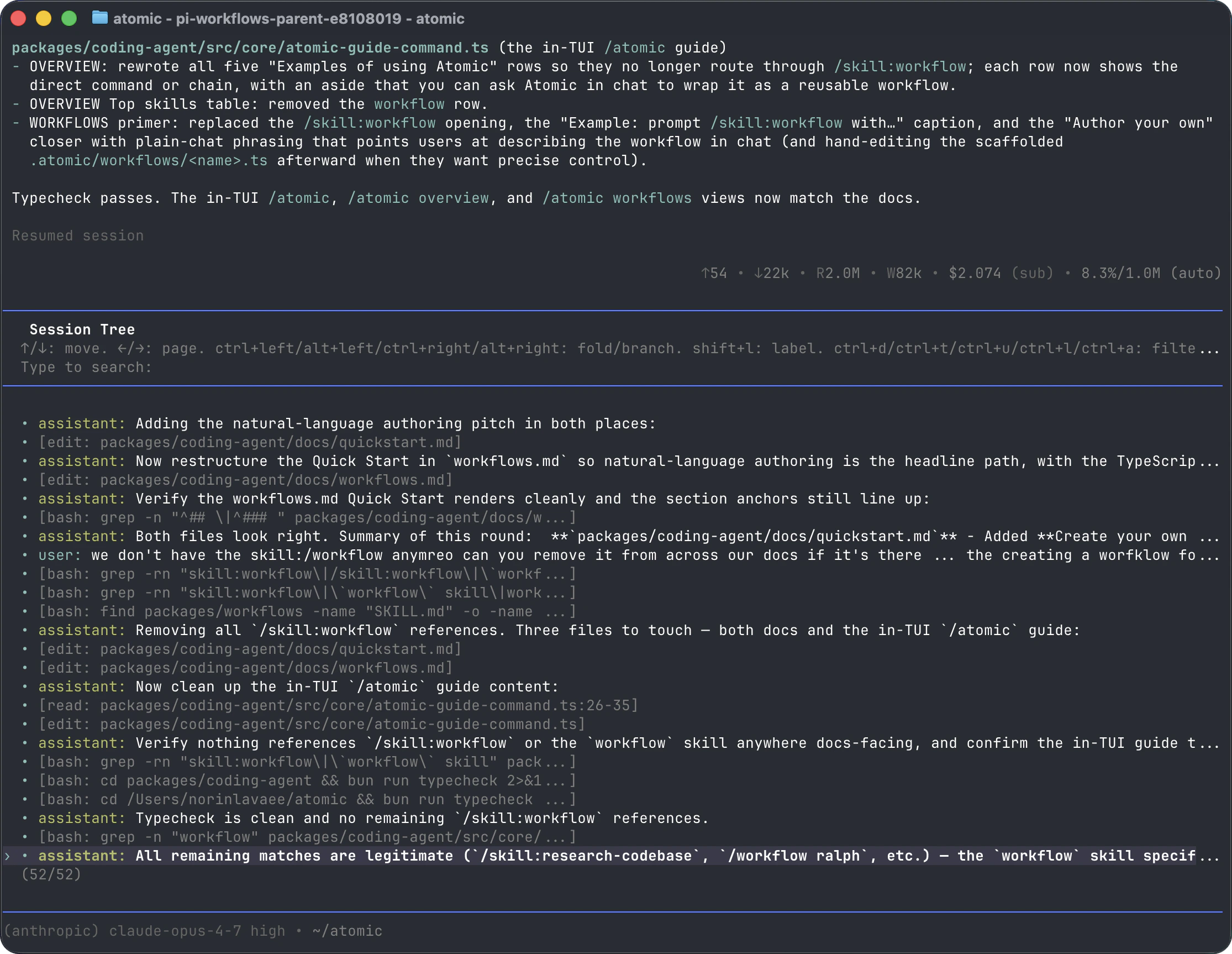
Tree Controls
Filter modes are: default, no-tools, user-only, labeled-only, and all. Configure the default with
treeFilterMode in Settings.
Label edits are saved before the tree is updated. While a save is pending, the label editor stays open. If saving fails, Atomic displays the error and keeps your text so you can retry with Enter or cancel with Escape.
Selection Behavior
Selecting a user or custom message:- Moves the leaf to the selected message’s parent.
- Places the selected message text in the editor.
- Lets you edit and resubmit, creating a new branch.
- Moves the leaf to that entry.
- Leaves the editor empty.
- Lets you continue from that point.
/tree, /fork, and /clone
Use
/tree when you want to keep alternatives together. Use /fork or /clone when you want a separate session.
Branch Summaries
Branch summaries are compact records of what happened on a session branch. When/tree switches away from one branch to another, Atomic can optionally summarize the abandoned branch. The prompt lets you choose no summary, the default summary prompt, or custom focus instructions; when branchSummary.skipPrompt is enabled, Atomic skips the prompt and defaults to no summary.
Moved to Compaction & Branch Summarization.
Session Format
Sessions contain message entries, model changes, thinking-level changes, context-window changes, labels, active verbatimcompaction boundaries, branch summaries, and extension entries. Explicit JSONL stores and exports serialize those entries as JSONL. Retired context_compaction and non-verbatim compaction records remain parseable but inert.
For parsers, extensions, SDK usage, and the full SessionManager API, see Session Format.